
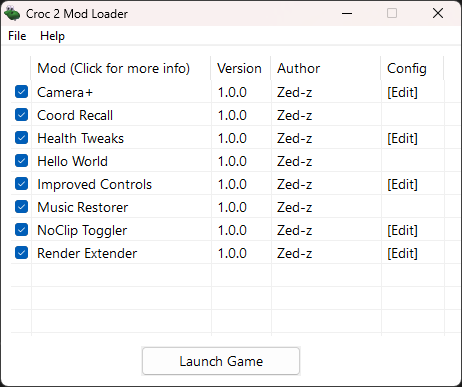
Croc 2 Mod Loader
ASI Mod Loader and Modding API for Croc 2
Compatible versions
Croc 2 Mod Loader supports all official, unmodified PC releases of the game, that is:
- US (SHA256:BAF84A039DB9581C56A52A8C1C5A318BCE13C3A72565FB6AC19B226D926BE0DE)
- EU (SHA256:38BDFCFF386F52824A718DE70B5710CF32F2263DD9C23FEED4FB39AE741C1720)
- DEMO (SHA256:074C0E4333C76635D3F214E6D89AB2F758FE233E6D4B718F7C5A7E0F11B7D24B)
Make sure that the game files are not modified and acquired from legitimate sources.
The mod loader will not launch other versions to avoid crashing and corruption.
Note: Most development and testing is done on the US version, your mileage may vary on other versions.
Installation instructions
Prerequisites and downloads
Windows:
- Download and install the Microsoft Visual C++ Redistributable (x86)
Linux:
- Install wine and winetricks from your distribution's package manager
Installation steps
- Download the mod loader files from Releases
- Extract downloaded files and place them into the game's directory
dgVoodoo2 setup for custom GUI overlay
To display custom GUIs, the mod loader needs the game to have dgVoodoo2 applied.
Without it, the mod loader will continue to function, but you will not see the custom GUI overlay.
- Download dgVoodoo2 from here
- Extract dgVoodoo.exe and dgVoodoo.conf into the game's directory
- Additionally, extract the contents of the MS/x86/ directory into the game's directory as well
- Launch dgVoodoo.exe
- Configure the settings in the General and DirectX tabs as needed
- If you encounter graphical errors, or compatility issues on Linux, try an older version, such as v2.81.3
Wine prefix setup for Linux
NOTE: You will have to re-export WINEPREFIX and WINEDLLOVERRIDES every time you want to play the game. This can be automated with the use of a shell script or one of many available Wine wrappers.
-
Create a Wine prefix for the game and setup DLL overrides:
$ export WINEPREFIX=$HOME/.local/share/wineprefixes/croc2
$ export WINEDLLOVERRIDES="d3d8=n,b;d3d9=n,b;d3dimm=n,b;ddraw=n,b;dinput=n,b" - Install dependencies (VC++ Redistributable and DXVK) with winetricks: $ winetricks vcrun2022 dxvk
- Proceed with standard installation steps to install the mod loader and dgVoodoo2.
- You can launch the game with the following command (adjust for your install directory): $ wine "$HOME/.local/share/wineprefixes/croc2/drive_c/Program Files (x86)/Fox/Croc 2/Croc2.exe"
-
WARNING:
Occasionally, the game might not launch because of two things:
- Error creating file override directory Relaunch the game. If that doesn't work at all, simply remove the mods\.overrides folder in the game directory and try again.
- err:sync:RtlpWaitForCriticalSection Relaunch the game (possibly multiple times). Also note that Wine stops responding to any key presses when that happens, so you will have to close the terminal or kill the Wine process.
Third-Party Licenses
- Ultimate ASI Loader - Copyright (c) 2023 ThirteenAG
- Dear ImGui - Copyright (c) 2014-2025 Omar Cornut
- MinHook - Copyright (c) 2009-2017 Tsuda Kageyu
- Simple DirectMedia Layer - Copyright (c) 1997-2026 Sam Lantinga
- Scabber Font by GGBotNet, licensed under the Creative Commons Zero v1.0 Universal license.
- Inter Font by Rasmus Andersson, licensed under the SIL Open Font License 1.1.
- Roboto Mono Font by Christian Robertson, licensed under the SIL Open Font License 1.1.
Licenses for the above mentioned are available on the GitHub repository and within the launcher.
Frequently Asked Questions
Q: The game does not access the registry / does not remember settings!
A: It appears to be an issue with Windows permissions of the game's executable. To fix it, run the game as an administrator once and change some settings for the game to set up registry keys.
Q: The game does not recognize controller input!
A: To make sure controller input works, plug your controller in before starting the game. You may also need to click out and back into the game's window for it to be recognized fully.
Special Thanks
- Thanks to ThirteenAG for developing Ultimate ASI Loader (support here)
- Thanks to Dege for developing dgVoodoo2 (support here)
- Thanks to ocornut for developing Dear ImGui (support here)
- Thanks to TsudaKageyu for developing Minhook (support here)
- Thanks to Thermospore, hdc0, limbus, Ray and Rartrin from the Croc & Stuff Discord server for valuable insight about the game!
- Thanks to Trev for his patches to make the loader compile and run on Linux, and for providing installation instructions!
- Thanks to Argonaut Games for developing Croc 2!