
Features
Below are the main features built into Croc 2 Mod Loader.
Game launcher and mod loader
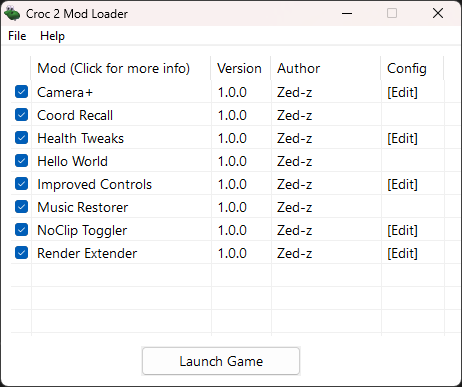
Shows a launcher before starting the game. There, you can enable and disable your mods and change their settings!
Croc 2 Mod Loader can load .asi mod files that are able to change the game's behavior and even override some assets. Mods can also add options to the menu bar for easy access to different features!
Mods are written in C++ with the help of the provided modding API.
Mouse uncapture
The loader can overwrite some game code responsible for capturing the mouse in the game window and making it visible. When enabled, the game never captures your mouse and acts like any other window. Cursor freedom at last!
Big thanks to hdc0 for the game insight that made this possible!
Custom UI overlay
With the help of ocornut's Dear ImGui, the game can display custom UI elements, providing a look into the game's inner workings. It even includes a real-time in-game minimap!
Cheat code management
Did you know that Croc 2 has cheat codes you can type in on the main menu? They're neat, but pretty tedious to have to type out every time you launch the game.
With Croc 2 Mod Loader, you can manage them with UI options. They also get saved across play sessions!
Modern controls and vibration
The loader utilizes modern input APIs for better compatibility with game controllers.
With this, you can choose which input device to control with, and tweak its deadzone.
It also brings back the ability to control Croc with the DPAD and includes an option to automatically use type 2 controls when doing so, to mimic how the Croc 1 Remaster controls. Also, brings back using the sidestep buttons to turn mid-air!
Registry bypass
The original game makes heavy use of the registry for storing game settings. Not only does it make it difficult to modify and restore these settings, it also causes issues when having multiple copies of the game installed (especially when using the EU version with non-English language). The loader can bypass registry calls and store game settings in a local ini file.